AI Photo Editor: A Practical Guide for Product Brands
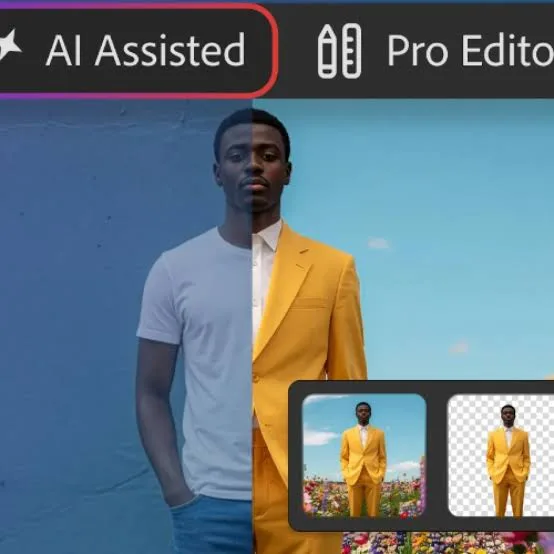
AI Photo Editor: A Practical Guide for Product Brands
An AI photo editor is software that uses machine learning to edit images automatically — removing backgrounds, fixing lighting, resizing for platforms, and generating new scenes around a product. For e-commerce and retail brands, it turns hours of manual retouching into minutes, without a studio or a designer on call.
This guide is written for people who sell things: shop owners, DTC founders, marketplace sellers, and small marketing teams. It skips the hype and focuses on what actually moves product listings and ad performance.
[IMAGE: Split-screen showing a raw phone photo of a product on a cluttered table beside a clean, lit, catalogue-ready version]
What Does an AI Photo Editor Actually Do?
An AI photo editor automates the repetitive, skill-heavy parts of product photography. Instead of masking, dodging, and burning by hand, you describe what you want or pick a preset, and the model does the pixel work.
The most common jobs are background removal, background replacement, lighting and colour correction, object cleanup, and upscaling blurry shots. Newer tools also generate entirely new backdrops — a marble countertop, a festive table, an outdoor market stall — around the same product.
The key difference from older editors is intent. You can say "put this bottle on a warm wooden shelf with soft morning light" and get a usable draft, rather than building that scene layer by layer. That shift is what makes it practical for teams without a designer.
For product businesses, the real payoff is consistency at volume. When you have 200 SKUs, the bottleneck is not creativity — it is producing 200 clean, on-brand images that look like they belong to the same shop.
How Do You Edit Product Photos With AI Step by Step?
Start with the best raw photo you can get, then let the AI handle correction and staging. A sharp, well-exposed source image always produces a better edit than trying to rescue a dark, blurry one.
First, shoot the product on a plain surface with even light — a window on an overcast day works well. Avoid harsh shadows and keep the full product in frame so the AI has clean edges to work with.
Second, remove or replace the background. For catalogue and marketplace listings, a pure white or light neutral background is usually safest. For ads and social, a styled scene adds context and stops the scroll.
Third, correct colour so the product matches reality. This matters for returns — a mug that photographs too orange will disappoint the buyer and cost you a refund.
Fourth, resize and export for each destination: square for feed posts, vertical for stories and reels, wide for website banners, and the exact pixel specs your marketplace demands.
[IMAGE: One product shown in four aspect ratios side by side — square, vertical 9:16, wide banner, and marketplace thumbnail]
Tools like QuadraPost let you upload one real product photo and generate editable campaign options in different formats using your brand colours and tone, which collapses these steps into a single pass when you are producing for several channels at once.
Which AI Photo Editor Features Matter Most for E-commerce?
Background control and brand consistency matter more than flashy filters. A shop's images need to look like a set, not a random collection, and most of that comes from controlling background, lighting, and colour tone.
Batch editing is the second priority. If you can apply the same treatment to fifty images at once, you save the hours that actually add up across a season.
Format presets are the third. Every platform has its own crop and size rules, and manually exporting each one is where small teams lose momentum before a launch.
Finally, editability. The best output is not a locked final image but a draft you can nudge — swap the background, change a colour, move the product — without starting over. Generate-and-adjust beats generate-and-pray.
Be wary of tools that only produce beautiful one-offs with no way to reproduce the look. A brand is a repeatable style, and you need the editor to respect that.
How Do You Keep AI-Edited Images On-Brand?
Feed the tool your brand rules before you generate, not after. The fastest way to look off-brand is to accept whatever palette and mood the model defaults to.
Define three things up front: your core colours (as hex codes if the tool supports them), your tone (clean and minimal, warm and homey, bold and loud), and your typical backdrop style. Reuse these across every campaign so a returning customer recognises you instantly.
Keep a small reference folder of your best past images. When you generate something new, compare it against those — if it clashes, adjust before publishing rather than letting the feed drift.
An AI photo editor that works with brand colours and tone makes this easier, because you set the guardrails once instead of correcting every image. QuadraPost is built around this: you supply the brand colours and tone, and the generated options stay inside them.
Remember that on-brand also means honest. If you dramatically restyle a product's colour or shape, you risk the gap between the ad and the parcel — which drives returns and bad reviews.
How Should You Adapt Product Images for Seasons and Festivals?
Refresh backgrounds and props to match the moment, but keep the product itself consistent. Seasonal staging is one of the cheapest ways to make a familiar catalogue feel current and worth a second look.
Map your retail calendar first. For many markets that means back-to-school, year-end holidays, and local festivals — Diwali and Holi in India, Lunar New Year across East and Southeast Asia, Ramadan and Eid in many regions, plus the big sale moments like Black Friday and regional mega-sale days.
[IMAGE: Same skincare bottle staged three ways — a Diwali setting with diyas and marigolds, a minimalist winter-holiday scene, and a bright spring layout]
For each season, change the backdrop, lighting warmth, and a prop or two. A candle on a wooden table in December, strung lights and warm bokeh for a festival, fresh flowers and daylight for spring. The product stays identical; only the world around it shifts.
This is where AI generation earns its keep. Producing a festival variant for every SKU by hand is impractical; generating editable variants from one source photo makes seasonal campaigns realistic for a small team.
Plan these a few weeks ahead so your listings, ad creatives, and social posts all switch over together rather than piecemeal.
Where Do You Use AI-Edited Images Once They're Made?
Use different crops of the same campaign across every channel you sell on. One strong product edit can fuel your website, marketplace listings, paid ads, and organic social if you export it in the right shapes.
For marketplaces, follow the strict image rules — usually a clean primary image plus lifestyle shots that show scale and use. For your own site, lead with a hero image and support it with detail and context shots.
For social, vertical formats dominate stories and short video, while square still works in the feed. The same scene, recropped, keeps your presence coherent across platforms.
For messaging and sharing channels — where a lot of retail selling happens through direct chats and broadcast lists — a bright, clear image that reads well on a small screen beats a busy one. Keep the product large and the text minimal.
Reuse deliberately. A single well-built campaign that appears consistently everywhere builds more recognition than scattered one-off images that never connect.
What Are the Limits of an AI Photo Editor?
AI editors are powerful but not magic, and knowing the limits saves you from embarrassing mistakes. They can misread reflective surfaces, warp text on packaging, and invent details that are not on the real product.
Always review generated output closely before publishing. Check logos, labels, counts (did it add an extra button?), and edges where the product meets the background.
They also cannot replace a genuinely bad source photo forever. Upscaling helps, but detail that was never captured cannot be truly recovered — it can only be plausibly guessed, and guesses can mislead buyers.
Finally, no tool replaces judgement about honesty and fit. You decide whether an edit represents the product fairly. Used well, an AI photo editor is a fast, affordable studio for product brands; used carelessly, it just produces pretty pictures that do not sell or, worse, cause returns.
Create Your Campaign
Ready to turn one product photo into a full set of on-brand, ready-to-post images? Upload a real product photo to QuadraPost and generate editable image and video campaign options in your brand colours and tone. Start your free trial.
FAQ
Is an AI photo editor good enough for professional product listings?
Yes, for most catalogue and ad images, provided you start with a sharp, well-lit source photo and review the output for accuracy. It handles background, lighting, and formatting well, but you should always check labels, colours, and edges before publishing.
Can an AI photo editor remove and replace backgrounds automatically?
Yes, automatic background removal and replacement is one of the core features. You can swap a cluttered backdrop for a clean white studio look or a styled seasonal scene, then recrop the result for different platforms.
Will AI-edited images still match my brand style?
They can, if you set your brand colours, tone, and backdrop style before generating rather than correcting afterwards. Tools that work with your brand colours and tone keep output consistent, so a returning customer recognises your shop across every channel.
How do I avoid AI images misrepresenting my product?
Use an accurate source photo, avoid changing the product's real colour or shape, and review each image for invented or warped details. Honest images reduce returns and complaints, since buyers receive exactly what the ad showed.