AI Image Generator From Image: Practical 2024 Guide
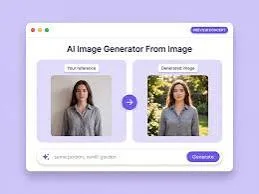
AI Image Generator From Image: A Practical Guide for Product Brands
If you sell products online or in a store, you already own the most valuable asset for an ad campaign: a real photo of what you sell. An AI image generator from image takes that single photo and turns it into polished, varied, on-brand visuals — without a studio booking, a photographer, or a week of back-and-forth.
This guide explains how image-to-image AI actually works, when to use it, and how to get results that look like your brand instead of generic stock art. It's written for e-commerce sellers and retail brands who need good visuals fast and on a budget.
What Is An AI Image Generator From Image?
An AI image generator from image is a tool that takes an existing picture as input and produces new images based on it. Instead of starting from a blank text prompt, you give the model a real photo — say, your product on a plain table — and it generates fresh scenes, backgrounds, lighting, and compositions around that product.
This is different from text-to-image generation, where you describe something in words and the AI invents it entirely. Image-to-image keeps the thing that matters — your actual product — and changes everything around it.
For product businesses, this distinction is the whole point. A shopper needs to recognise the exact item they'll receive, so the product has to stay accurate while the setting becomes more appealing.
[IMAGE: Side-by-side comparison of a plain product photo on a white background next to an AI-generated lifestyle version of the same product in a styled kitchen scene]
How Does Image-To-Image AI Actually Work?
At a basic level, the tool analyses your uploaded photo, isolates the key subject, and then regenerates the surrounding image guided by your instructions. You typically control how much the AI is allowed to change, from a light touch-up to a completely new scene.
Most tools let you describe the result you want in plain language. You might type "place this candle on a rustic wooden shelf near a window with soft morning light," and the AI builds that environment around your candle.
The quality of the input photo matters more than people expect. A sharp, well-lit photo with the product clearly separated from the background gives the AI a clean starting point, which leads to cleaner, more believable output.
It also helps to think in terms of what you want to keep versus what you want to change. Keep the product shape, colour, and label; change the backdrop, props, and mood.
When Should You Use An AI Image Generator From Image?
Use it whenever you need many versions of a product visual quickly and affordably, especially for social ads, product listings, and seasonal campaigns. It shines in exactly the moments where traditional photography is too slow or too expensive.
Seasonal pushes are the clearest example. A festive sale — whether that's a holiday gifting season, a spring clearance, or a back-to-school stretch — often needs dozens of variations across formats, and reshooting for each occasion isn't realistic for most small teams.
Marketplace listings are another strong fit. If you sell on platforms where the first thumbnail decides whether someone clicks, having several styled options to test can be the difference between a scroll-past and a sale.
It's also useful for brands that launch frequently. A new colourway or a limited edition doesn't always justify a full shoot, and image-to-image lets you extend your existing visual library instead.
[IMAGE: A grid of four seasonal variations of the same product — summer outdoor, winter cosy, festive gift-wrapped, and minimalist studio]
How Do You Get On-Brand Results Instead Of Generic Ones?
The trick is to feed the AI your brand specifics instead of accepting its defaults. Generic output happens when you give generic instructions, so the fix is to be concrete about colour, mood, and context.
Start with your brand colours. If your palette is warm terracotta and cream, say so explicitly, because an AI left to its own devices will often default to flat, neutral studio tones that don't match your identity.
Next, describe your brand's tone in words a model can act on. "Clean and premium" produces very different results from "playful and bright," and naming it directly keeps your visuals consistent across a campaign.
This is one area where a purpose-built tool helps. QuadraPost lets you upload a real product photo and generate editable image and video campaign options using your brand colours and tone, so the output starts aligned to your identity rather than something you fight to correct afterwards.
Finally, keep a short reference list of recurring elements — a specific prop, a signature background texture, a consistent framing — and reuse it across prompts so your feed looks like it belongs to one brand.
What Makes A Good Source Photo?
A good source photo is sharp, evenly lit, and shows the product clearly against an uncluttered background. The cleaner the input, the fewer artefacts and oddities you'll see in the generated result.
Shoot in diffused natural light when you can. Harsh shadows and strong reflections confuse the model and tend to carry over into the new images as distracting glare or warped edges.
Capture the product from a straightforward angle that represents it honestly. Extreme angles or heavy existing editing give the AI less reliable information to work with, which increases the chance of distortion.
If your product has text, a logo, or fine detail, make sure those are legible in the original. AI regeneration can soften or garble small text, so a crisp starting point protects the parts customers actually read.
[IMAGE: An example of a strong source photo — product centred, soft even lighting, plain neutral surface, no clutter]
How Do You Turn One Image Into A Full Campaign?
Start with one strong product photo, then generate variations across the formats and channels you actually post to. A single hero image can become a square post, a vertical story, a wide banner, and several themed scenes.
Match each variation to where it will live. A vertical format suits full-screen mobile stories, a square works for feed posts, and a wide crop fits website banners and email headers — so plan the aspect ratios before you generate.
Build in seasonal and occasion-based variants from the same base. The same product can carry a gifting theme during a festival, a bright outdoor theme in summer, and a cosy indoor theme in colder months, all from one source image.
Keep everything editable. The ability to adjust a background, swap a colour accent, or tweak text per channel means you can localise and test without regenerating from scratch each time — which is how one photo stretches into a genuine campaign.
How Do You Avoid Common Mistakes With Image-To-Image AI?
The most common mistakes are over-editing the product, ignoring aspect ratios, and shipping output without a human review. Each is easy to avoid once you know to look for it.
First, don't let the AI alter the product itself. If a generated image changes your product's shape, colour, or label, discard it — misrepresenting what the customer receives damages trust and drives returns.
Second, always review for artefacts. Look closely at edges, reflections, hands if present, and any text, because small glitches that you miss on a thumbnail become obvious at full size.
Third, respect platform norms. Some channels penalise obviously synthetic or low-effort visuals, so aim for images that look like intentional brand content rather than quick AI experiments.
Finally, keep accuracy honest in claims. The visual can be aspirational, but it should still represent a real, available product at the price and spec you advertise.
Quick Workflow Recap
Upload a clean, well-lit product photo. Describe the scene, your brand colours, and your tone. Generate several variations, pick the strongest, check for artefacts, then export the formats you need per channel.
Treat the first pass as a starting point rather than a finished ad. The brands that get the most from these tools iterate a little, keep what's on-brand, and reuse their best prompts as templates.
Ready to turn one product photo into a full campaign? Upload a real photo, generate editable image and video options in your brand colours and tone, and ship visuals that actually look like you. Start your free trial on QuadraPost.
FAQ
What is an AI image generator from image?
It's a tool that takes an existing photo as input and generates new images based on it. For product brands, it keeps your real product accurate while changing the background, lighting, and scene to create polished, varied ad visuals.
Will the AI change what my product actually looks like?
A good image-to-image tool keeps the product's shape, colour, and label intact while changing the surroundings. Always review output and discard any version that alters the product, since misrepresenting the item damages trust and increases returns.
What makes a good source photo for image-to-image AI?
Use a sharp, evenly lit photo with the product clearly shown against an uncluttered background. Diffused natural light, a straightforward angle, and legible logos or text all help the AI produce cleaner, more believable results.
Can I create a whole campaign from a single product photo?
Yes. From one strong source image you can generate multiple formats — square posts, vertical stories, and wide banners — plus seasonal and occasion-based themes, then edit each version per channel instead of reshooting.